

Crypto taxes become difficult when activity is spread across exchanges, wallets, staking platforms, NFTs, and DeFi protocols. The IRS requires taxpayers to report digital-asset income, gains, and losses, and Form 1099-DA is now part of the filing landscape. Yet broker statements may not contain every cost-basis detail, so investors still need a complete transaction history before filing.
CoinLedger is designed to gather that history, flag missing information, calculate gains and income, and turn the results into tax reports. For this CoinLedger review, we examined the current pricing, transaction limits, integrations, tax forms, security information, and refund rules, then compared the service with Koinly. We did not prepare or file a return through the software ourselves, so our assessment is based on product documentation and the workflow available to prospective users.
CoinLedger Review: What the Platform Does
CoinLedger is cryptocurrency tax and portfolio-tracking software. It was founded in 2018 as CryptoTrader.Tax by David Kemmerer, Lucas Wyland, and Mitchell Cookson, then rebranded as CoinLedger. The platform is built for investors whose records are scattered across exchanges, public wallet addresses, CSV files, and on-chain protocols.
The software imports transaction history, calculates capital gains and taxable income, and generates reports that can be downloaded, sent to an accountant, or transferred into filing software such as TurboTax. CoinLedger does not replace a complete tax return or professional advice; its main job is to organize crypto activity and produce the records needed for filing.
CoinLedger advertises more than 1,000 integrations, support for over 20,000 cryptocurrencies, unlimited wallet and exchange connections, and free portfolio tracking. The strongest value is not simply adding up trades. It is identifying transfers, missing cost basis, duplicated activity, and other data problems before a tax report is downloaded.
How Does CoinLedger Work?
The workflow is straightforward on paper, although the amount of cleanup depends on how complex your transaction history is.
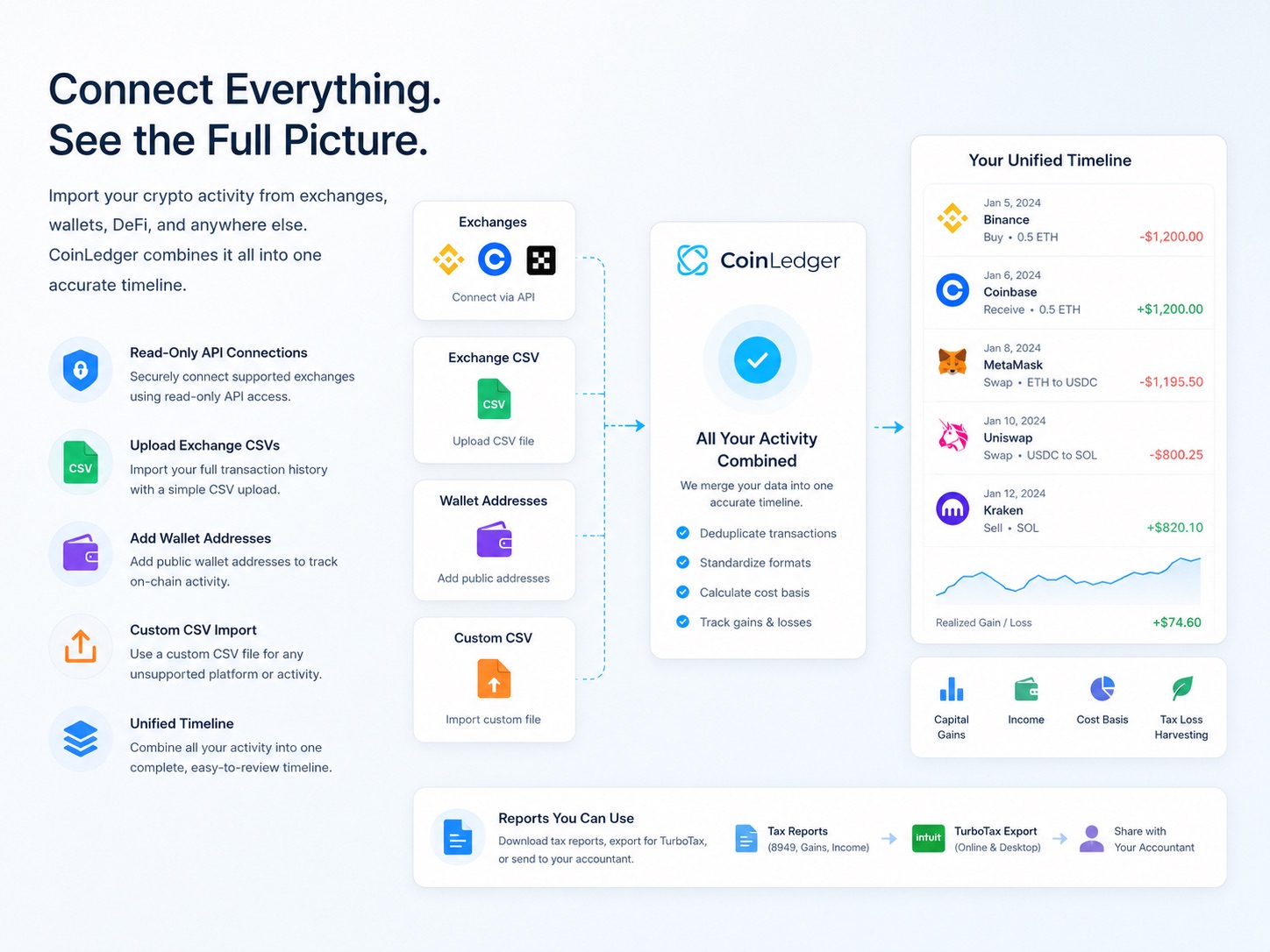
1. Import Exchanges and Wallets
Users can connect supported exchanges through read-only APIs, upload exchange CSV files, add public wallet addresses, or use a custom CSV. CoinLedger can combine activity from multiple sources into one timeline, which is useful when assets have moved between platforms.
2. Review Errors and Missing Cost Basis
After the data is imported, CoinLedger highlights missing cost basis and inconsistent transaction history. This step matters because an exchange API may not export every deposit, withdrawal, reward, or older transaction. Users may need to add another wallet, upload a different CSV, classify a transfer, or enter missing information manually before the report is reliable.
The reconciliation tools are one of CoinLedger’s strongest features for beginners, but they are not a guarantee that a complex DeFi history will become accurate without review. The software can identify a problem; the user still needs enough records to resolve it.
3. Calculate Gains, Losses, and Income
CoinLedger calculates capital gains and losses and separates taxable crypto income such as staking rewards, mining income, and interest. It also supports methods including FIFO, LIFO, HIFO, and adjusted-cost approaches. The appropriate method depends on the user’s country and tax situation, so the most tax-efficient option is not automatically the correct option for every filer.
4. Download or Export Tax Reports
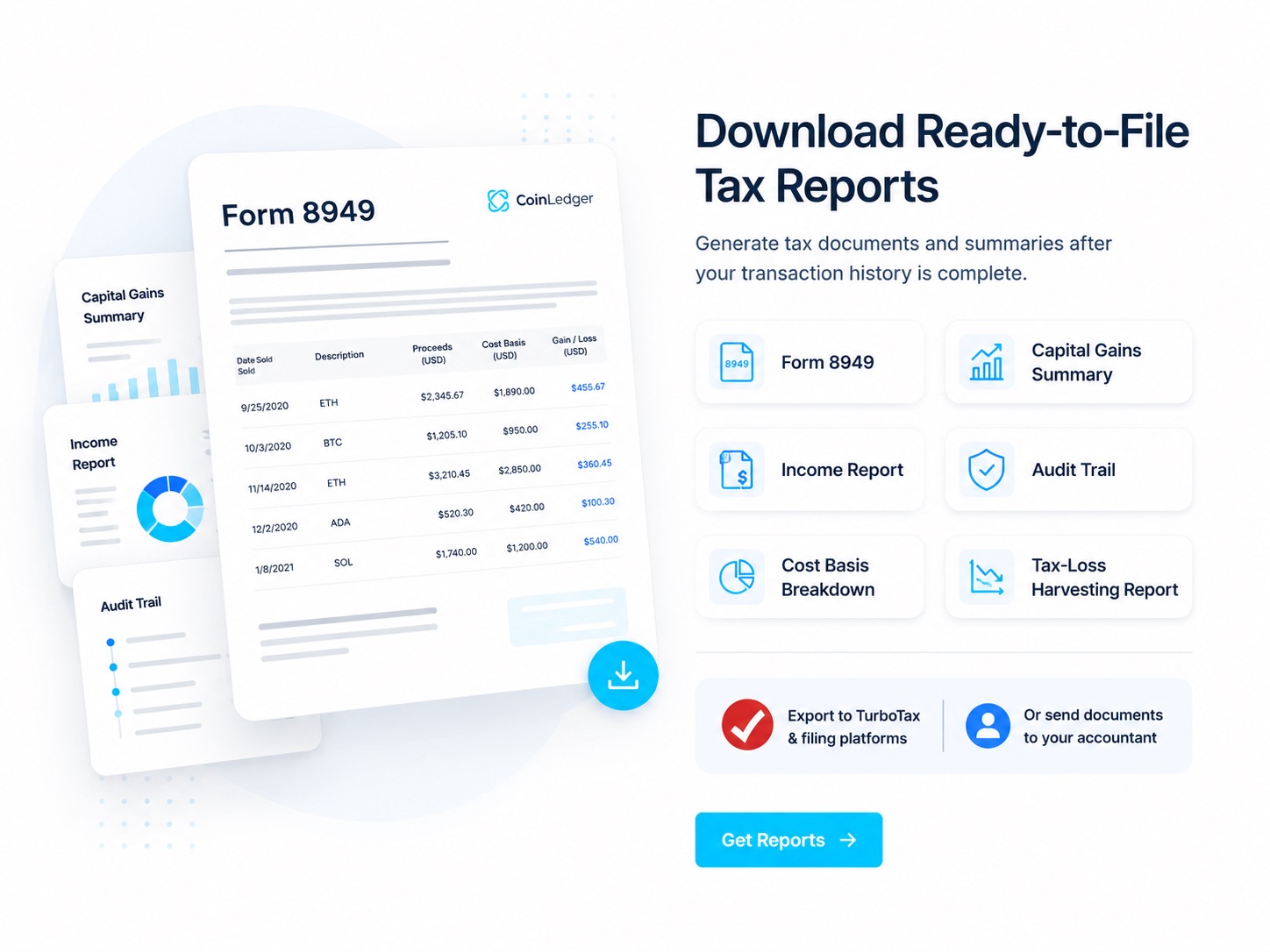
Once the transaction history is complete, users can download reports including Form 8949, capital gains summaries, income reports, audit trails, cost-basis breakdowns, and tax-loss harvesting reports. CoinLedger also provides files for TurboTax and other filing platforms, or the documents can be sent to an accountant.
CoinLedger Pricing in 2026
CoinLedger is free to use while importing transactions, tracking a portfolio, and previewing gains and losses. Payment is required when the user wants to download a tax report. Each purchase covers one tax year rather than an ongoing all-years subscription.
When we checked, the pricing page listed these report tiers:
| Plan | Price | Transaction Limit | Best For |
|---|---|---|---|
| Free preview | $0 | Import and preview only | Checking data before buying |
| Hobbyist | $49 | Up to 100 transactions | Occasional investors |
| Investor | $99 | Up to 1,000 transactions | Active investors using several platforms |
| Pro | $199+ | 3,000+ transactions | Frequent traders and complex histories |
All paid tiers include customer support, unlimited wallet and exchange syncs, portfolio tracking, and the same core tax-report features. Higher pricing is based mainly on transaction count. Users above the displayed Pro limit can purchase additional capacity inside the app.
The important catch is the refund policy. CoinLedger advertises a 14-day money-back guarantee, but eligibility requires the request to be made within 14 days, no tax report to have been downloaded, and a verified software bug or product limitation that prevents an accurate report. Difficulty importing a file or general dissatisfaction does not automatically qualify.

CoinLedger Features That Matter Most
Exchange, Wallet, DeFi, and NFT Support
CoinLedger supports centralized exchanges, public wallet addresses, DeFi protocols, NFTs, staking, margin trading, and custom transaction files. The breadth is useful, but “supported” does not always mean every transaction type imports perfectly. Some exchanges limit the history available through an API, and unusual smart-contract activity may still need manual classification.
Error Reconciliation and Audit Trail
Missing cost basis is one of the most common reasons a crypto tax calculation looks wrong. CoinLedger flags those gaps and keeps an audit trail showing how the figures were calculated. This makes the final report easier to review and gives an accountant a clearer record than a single unexplained gain-or-loss total.
TurboTax and Accountant Exports
CoinLedger is an official TurboTax partner and provides export files for TurboTax Online and Desktop. It also creates reports that can be used with other tax software or delivered to a tax professional. Users should remember that exporting a file is not the same as filing a return: capital gains, crypto income, and other tax items still need to be reviewed in the final tax filing.
Security and Data Control
CoinLedger states that exchange connections use read-only permissions and that the platform cannot move funds or access private keys. Data is encrypted in transit, payments are processed through Stripe, and users can delete transaction data and API connections from their accounts.
The company also disclosed a November 2025 incident at analytics provider Mixpanel. The affected data included some profile information, such as email addresses and approximate browser-derived location, but CoinLedger said passwords, private keys, tax forms, transaction data, bank details, and credit card numbers were not involved. The disclosure is a reminder that even read-only financial tools still hold personal information worth protecting.

Pros and Cons
What We Loved
- Free importing, portfolio tracking, and tax preview let users inspect the data before paying
- More than 1,000 integrations and unlimited wallet and exchange connections cover most mainstream workflows
- Missing-cost-basis warnings and error reconciliation help identify incomplete transaction histories
- Reports include Form 8949, income summaries, capital gains, audit trails, and tax-loss harvesting data
- Read-only API permissions mean CoinLedger cannot move cryptocurrency or access private keys
What Could Be Better
- Reports are purchased separately for each tax year, so repeat users pay again every filing season
- The $199+ tier can become expensive for traders with thousands of transactions or large volumes of micro-rewards
- Complex DeFi and incomplete exchange exports may still require manual reconciliation or professional help
- The 14-day refund policy is narrow and generally does not apply after a report has been downloaded
Who Is CoinLedger Best For?
CoinLedger is best for US investors whose crypto activity is spread across several exchanges and wallets and who plan to file with TurboTax or send organized reports to an accountant. It is especially useful when transfers between platforms, staking income, NFTs, or DeFi activity make a simple exchange statement incomplete.
It is less compelling for someone with only a handful of straightforward trades on one exchange, because the filing platform or a carefully maintained spreadsheet may already cover that situation. It is also a weaker fit for users who want a tax professional to take full responsibility for preparing and filing the entire return, or for active traders who need extensive hands-on reconciliation included in the base price.
The safest buying approach is to import every account, resolve the major warnings, and inspect the free preview before purchasing. That matters because the refund terms become much more restrictive once a tax report is downloaded.
CoinLedger vs Koinly
CoinLedger and Koinly are closely matched on entry pricing and transaction limits. The better choice depends less on the headline price and more on the user’s country, import history, preferred filing software, and tolerance for manual cleanup.
| Factor | CoinLedger | Koinly |
|---|---|---|
| Starting paid report | $49 for up to 100 transactions | $49 for up to 100 transactions |
| Mid-tier report | $99 for up to 1,000 transactions | $99 for up to 1,000 transactions |
| High-volume tier | $199+ for 3,000+ transactions | From $199 for 3,000+ transactions |
| Free use | Portfolio tracking, imports, and report preview | Free trial with imports and gains preview |
| Refund policy | 14 days, with conditions and no downloaded report | 7 days, advertised as no-questions-asked |
| Best fit | US filers, TurboTax workflow, beginner-friendly reconciliation | International users and shoppers wanting a broader free trial |
For a US investor who wants a clear TurboTax path and strong missing-data warnings, CoinLedger is an easy recommendation. Koinly may be more attractive for international reporting, users who want to import a larger history before paying, or anyone who prefers its shorter but less restrictive refund promise. Because the pricing is so similar, import quality should decide the comparison: test both with the same wallets before buying either report.
Final Verdict: Should You Use CoinLedger?
CoinLedger is a strong crypto tax tool for investors who have outgrown a single-exchange tax summary. Its most valuable features are the multi-platform import workflow, missing-cost-basis warnings, audit trail, and TurboTax-compatible reports. The free preview also lowers the risk of paying before you know whether the software can make sense of your transaction history.
It is not a one-click substitute for accurate records or professional advice. Complicated DeFi activity, incomplete APIs, and missing historical wallets can still require manual work. High-volume users should also compare the final transaction-based price with Koinly and other platforms before purchasing.
Our take: use CoinLedger’s free import and reconciliation process first. If the balances, transfers, gains, and income look complete, the $49 or $99 plan offers reasonable value for most casual and active investors. Do not download a paid report until the data is clean, because the refund policy is limited after that point.
Frequently Asked Questions
Is CoinLedger free?
CoinLedger is free for importing exchanges and wallets, tracking a portfolio, and previewing gains and losses. A paid plan is required to download or export a tax report. Paid reports start at $49 for up to 100 transactions and cover one tax year.
Is CoinLedger safe to connect to an exchange?
CoinLedger says its exchange connections use read-only permissions, so the platform cannot trade, withdraw funds, or access private keys. Users should still verify that every API key has only the minimum required permissions and remove unused connections after filing.
Does CoinLedger send information directly to the IRS?
CoinLedger prepares tax reports but does not automatically file a complete federal return for standard DIY users. You download the reports, import them into filing software such as TurboTax, or send them to a tax professional. The taxpayer remains responsible for reviewing and filing the return.
Does CoinLedger work with TurboTax?
Yes. CoinLedger provides export files for TurboTax Online and TurboTax Desktop. After importing the crypto report, review the capital gains and any separate crypto income before submitting the final return.
Which CoinLedger plan should I choose?
Choose the plan based on the total transaction count for the tax year, including trades, deposits, withdrawals, staking rewards, and other imported activity. The $49 plan covers up to 100 transactions, the $99 plan covers up to 1,000, and the $199+ tier covers 3,000 or more. Import everything first so the app can show the transaction count before you pay.